When you work with digital content every day, copying text from images, PDFs, or videos can be frustrating — especially when the text isn’t selectable. That’s exactly where TextSniper comes in.
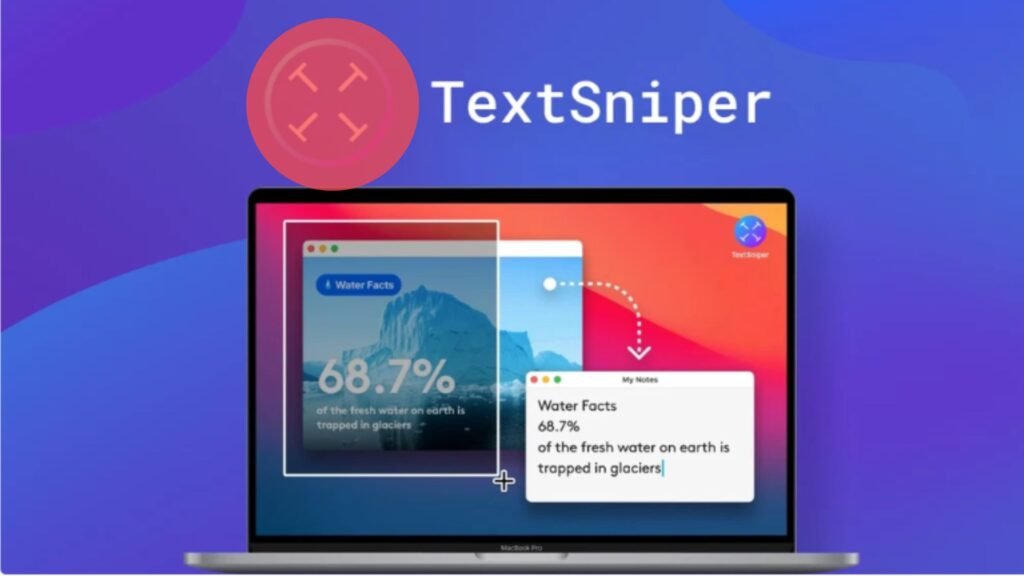
It’s a simple yet powerful OCR (Optical Character Recognition) tool designed for macOS that lets you instantly extract text from anything visible on your screen — whether it’s a photo, a PDF slide, a Zoom meeting, or even a paused YouTube video.
A Lightweight, Intuitive OCR Tool for macOS
Unlike bulky OCR software that requires multiple steps and cloud processing, TextSniper keeps things minimal and efficient. You don’t even have to open a separate window.
Once installed, it quietly sits in your Mac’s menu bar, ready whenever you need it.
All you have to do is press CMD + SHIFT + 2, select the area containing the text, and within seconds, the text is automatically recognized and copied to your clipboard.
You can then paste it anywhere — from Notes to Word, or even directly into your content editor. It’s that simple and fast.
Blazing-Fast, Accurate, and Private
Speed and accuracy are where TextSniper truly shines. It uses advanced OCR technology to deliver near-instant results, even with complex or stylized fonts. Best of all, it works completely offline, meaning your data never leaves your Mac.
No uploads, no cloud storage, no privacy concerns. Everything is processed locally — ensuring your text, screenshots, or confidential data remain secure.
This privacy-first design makes TextSniper especially appealing for professionals who handle sensitive information, such as customer support agents, writers, researchers, or corporate users.
Packed with Smart, Time-Saving Features
TextSniper is more than just a basic OCR tool. It comes with a range of handy features that make it even more versatile:
-
Text-to-Speech: Instantly convert recognized text into speech and have your Mac read it aloud. Perfect for proofreading or accessibility.
-
QR and Barcode Scanning: Quickly extract URLs, data, or text hidden in codes — great for marketing, packaging, or event materials.
-
Customizable Shortcuts: Tailor the app’s hotkeys to fit your workflow.
-
Minimal Interface: A clean, no-clutter design that stays out of your dock yet remains easily accessible.
-
Offline Mode: Works without an internet connection.
-
Multi-language Support: Available in English, German, French, Spanish, Portuguese, Italian, and Chinese (on macOS Big Sur and newer).
Who Is It For?
TextSniper is ideal for bloggers, content creators, designers, researchers, teachers, and customer support teams — anyone who often needs to capture or repurpose text from visual content.
Instead of wasting time typing out text manually, you can extract it in seconds and get back to what matters.
Pricing and Lifetime Deal
Currently available on AppSumo for a one-time payment of $6.49 (normally $9.99), TextSniper offers incredible value.
The license covers three Macs, includes 24-hour email support, and all future updates. You also get a 60-day money-back guarantee, so you can test it risk-free.
Final Verdict
TextSniper is a must-have productivity tool for Mac users who regularly work with text from non-editable sources.
It’s fast, accurate, privacy-focused, and extremely easy to use. Whether you’re capturing notes from a video lecture, extracting data from screenshots, or scanning barcodes, TextSniper makes the process effortless.
For a small one-time fee, you’ll save countless hours of manual typing. If you value speed, simplicity, and privacy, TextSniper – OCR Simplified is well worth it.