Swft Connect Even the nicest paper business cards end up lost, forgotten, or tossed in the nearest trash bin. And with fast-paced networking, you don’t always have time to dig around for the card you meant to hand out.
That’s why Swft Connect gives you a smarter way to share your information with fully customizable digital business cards you can access instantly through Apple Wallet, Google Wallet, QR code, or link.
Designed for freelancers, sales teams, and small businesses, Swft Connect helps you make a strong first impression every time—and ensures you never miss a connection again.
Build a Better Digital Business Card
Traditional business cards limit what you can include. But with Swft Connect, you can build a dynamic, interactive profile packed with everything a prospect needs.
You’re able to add contact details, social media links, videos, photos, testimonials, product demos, and even meeting schedulers like TidyCal or Calendly.
Because every profile is customizable, you can control your layout, colors, and branding. This ensures your digital business card reflects your personality or your company identity from the very first glance.
Plus, embedding scheduling links means potential clients can book a meeting on the spot—no back-and-forth emails required.
Share Your Business Card Instantly
With digital sharing, it’s easier than ever to connect with people in any setting.
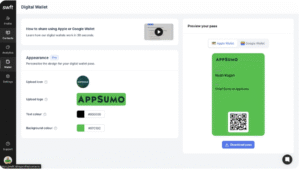
You can add your business card to your Apple or Google Wallet, making it accessible even when you’re offline or on the move.
When someone asks for your contact info, you simply tap your phone or show your unique QR code.
You can also paste your digital business card into your email signature, drop it into a LinkedIn message, or send it using a simple shareable link. This ensures your information is always one click away, whether you’re networking in person or online.
Exchange Contact Information and Organize Your Leads
Swft Connect isn’t just a prettier business card—it’s also a lightweight CRM that helps you keep track of the people you meet.
When you exchange contact details, you can add notes, apply tags, and group contacts into relevant categories. This makes it easier to remember where you met someone and what you discussed.
Because all contact info is digitized, you’ll save hours of manual data entry and reduce the risk of losing valuable leads. And every connection gets stored securely, so nothing slips through the cracks again.
Maintain Consistent Branding Across Your Organization
If you manage a team, Swft Connect gives you complete control over your brand’s presentation.
You can assign user roles, set permissions, and ensure everyone follows your company’s visual guidelines.
Swft’s ready-to-use templates ensure that all digital business cards look polished and consistent—whether you have five team members or fifty.
The centralized dashboard lets you see how each team member uses their profile and how often they engage with leads. This helps you understand what’s working and where team members might need support.
Final Verdict
Swft Connect replaces outdated business cards with a modern, customizable, and trackable digital alternative.
Whether you’re a freelancer trying to stand out, a sales manager streamlining lead capture, or a growing business wanting consistent branding across your team, Swft Connect gives you the tools to make networking smoother and more effective.
If you’re ready to ditch paper cards and upgrade your connections with a digital-first approach, Swft Connect helps you make a powerful impression—every single time.