Chrome Tab Reminder
Chrome Tab Reminder Remember websites at the right time
You open a website.
Then you plan to return.
However, later rarely comes.
Instead, tabs pile up.
Meanwhile, new tabs appear.
As a result, pages get lost.
Because of this, work feels messy.
Chrome Tab Reminder fixes this.
It sets reminders for websites.
Then Chrome alerts you.
Therefore, nothing is forgotten.
Stop relying on memory
People try to remember tabs.
However, memory fails often.
Bookmarks exist.
Yet they are easy to forget.
Meanwhile, tabs keep growing.
Because of this, focus breaks.
Chrome Tab Reminder helps.
Instead of remembering, you schedule.
Then you move on.
As a result, stress drops.
Set reminders fast
Chrome Tab Reminder is simple.
First, open a website.
Next, click the extension.
Then choose a reminder time.
That’s it.
Because steps are small, it is easy to use.
Therefore, you use it every day.
No forms exist.
Moreover, no settings exist.
Finally, nothing to learn.
Get alerts on time
Timing matters.
Sometimes today works.
Other times, tomorrow works better.
Meanwhile, some pages matter next week.
Because of this, choice matters.
Chrome Tab Reminder gives options.
For example, choose:
-
Later today
-
Tomorrow
-
Next week
-
Custom time
As a result, alerts feel right.
Close tabs without stress
Too many tabs cause stress.
Moreover, they slow Chrome.
Each tab shows work left.
However, open tabs do not help.
Chrome Tab Reminder changes this.
Instead, schedule reminders.
Then close tabs.
As a result, clutter disappears.
Because of this, focus improves.
Perfect for busy people
Chrome Tab Reminder fits daily work.
Because it is simple, anyone can use it.
For example, it helps:
-
Founders
-
Marketers
-
Developers
-
Students
-
Freelancers
Therefore, Chrome users benefit quickly.
Real-life use cases
Chrome Tab Reminder is simple.
However, it works in many ways.
For marketers:
Save competitor pages.
Then return later.
As a result, updates are seen.
For sales teams:
Revisit lead sites.
Then prepare for calls.
Therefore, meetings go smoothly.
For creators:
Save research tabs.
Then write later.
As a result, focus stays strong.
For students:
Save lessons and resources.
Then study later.
Because of this, learning is easier.
One tool.
Many uses.
Works quietly
Chrome Tab Reminder is silent.
It does not interrupt you.
Meanwhile, you keep working.
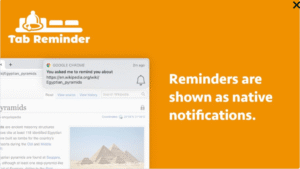
When time comes, Chrome alerts you.
Then you act.
Therefore, no searching is needed.
No scrolling needed.
Moreover, no guessing exists.
Everything appears on time.
No accounts required
Many tools need sign-ups.
However, this one does not.
No accounts exist.
Therefore, no passwords exist.
Moreover, no dashboards appear.
Because of this, setup takes seconds.
Install it.
Then use it.
Finally, continue working.
Fast and light
Chrome Tab Reminder runs smoothly.
It does not slow Chrome.
Moreover, it uses very little memory.
As a result, speed stays high.
It also protects your privacy.
No tracking occurs.
Therefore, no data selling.
Because of this, control stays yours.
Replace clutter with calm
Without reminders, tabs pile up.
Then stress builds.
With Chrome Tab Reminder, tabs have purpose.
You act now.
Or instead, schedule them.
As a result, nothing lingers.
Over time, habits form.
Therefore, focus improves daily.
Why AppSumo users love it
AppSumo users want clarity.
However, they also want speed.
They want:
-
One clear job
-
Easy setup
-
Fast results
Chrome Tab Reminder delivers all three.
Because it is focused, it works fast.
Therefore, adoption feels natural.
Small tool. Big result.
Productivity is not more work.
Instead, it is better timing.
Chrome Tab Reminder helps you remember.
Then it reminds later.
As a result, work feels lighter.
Open with purpose.
Close tabs confidently.
Finally, return on time.
Never forget websites
If you:
-
Keep too many tabs
-
Forget pages you need
-
Feel stressed
Then Chrome Tab Reminder helps.
Set reminders.
Therefore, close tabs.
Finally, stay focused.
All inside Chrome.