
What Is SheetMagic?
SheetMagic is an AI tool for Google Sheets. But more than that, it feels native.
In simple terms, it lets you use ChatGPT like a formula. And that changes how you work.
First, you write a prompt.
Then, you connect it to cells.
After that, you drag it down.
As a result, AI creates content for every row.
There is no code.
And there are no API keys.
So setup stays fast.
Because it works like Sheets, learning is easy. And because of that, you can start right away.
Why SheetMagic Was Built
Most AI tools work one task at a time. But real work repeats.
For example, you may need:
-
Many product descriptions
-
Many SEO titles
-
Bulk translations
-
Clean summaries
-
Organized data
Doing this by hand takes time. And it drains energy.
Because of this, SheetMagic focuses on bulk AI work. So you can scale without stress.
You write one prompt.
Then SheetMagic repeats it.
As a result, AI becomes a system. And not a manual job.
How SheetMagic Works
SheetMagic follows simple spreadsheet logic. And that makes it powerful.
First, you place data into rows.
Then, you write an AI prompt in one cell.
Next, you reference other cells.
For example:
-
At first, Column A holds product names.
-
Meanwhile, Column B lists product features.
-
In turn, Column C generates full descriptions.
After that, you drag the formula down.
Each row gets new content.
Meanwhile, you stay in control.
So scaling work feels easy. And results stay clean.
What You Can Do With SheetMagic
1. Create Content in Bulk
SheetMagic is built for volume. And it shows.
You can generate:
-
Product descriptions
-
Blog outlines
-
SEO titles and meta descriptions
-
Social posts
-
Ad copy
-
FAQs
-
Email drafts
Everything lives in one sheet. And when inputs change, outputs update.
As a result, content creation speeds up.
2. Rewrite and Improve Text
If you already have text, SheetMagic still helps.
For example, you can:
-
Rewrite sentences
-
Fix grammar
-
Change tone
-
Shorten text
-
Make text clearer
Because content stays in Sheets, comparison is easy. And because of that, editing takes less time.
3. Translate Content at Scale
Translation often slows teams down. But SheetMagic speeds it up.
You can translate:
-
Product catalogs
-
Marketing copy
-
Reviews
-
Internal notes
Also, you can control tone and style. So results stay consistent.
As a result, global content becomes easier to manage.
4. Automate Repetitive AI Tasks
Once set up, SheetMagic keeps running. And that saves time.
For example:
-
New rows create new content
-
Imported text gets grouped
-
Feedback gets summarized
So manual work drops fast. And output grows.
Instead of repeating prompts, you review results.
5. Organize Messy Data
SheetMagic is not only for writing. And that matters.
You can also:
-
Extract keywords
-
Create bullet points
-
Summarize long text
-
Classify answers
-
Turn text into clean fields
Because of this, data becomes useful again.
Who Is SheetMagic For?
SheetMagic works for many roles. And that makes it flexible.
Marketers
And marketers scale SEO and ad content faster.
eCommerce sellers
And sellers write product copy in bulk.
Agencies
And agencies deliver more work without hiring.
Founders
And founders move fast with small teams.
SEO specialists
And specialists scale metadata and plans.
Operations teams
And teams clean and analyze data.
So if you use Google Sheets daily, SheetMagic fits right in.
Why SheetMagic Is Different
Many AI tools promise speed. But they stop at single prompts.
SheetMagic focuses on repeatable work. And that is the key.
It:
-
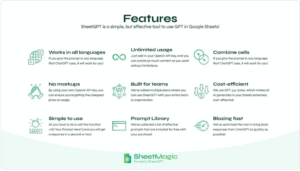
Runs inside Google Sheets
-
Handles bulk tasks
-
Uses simple formulas
-
Needs no training
-
Removes tool switching
So it does not replace ChatGPT. Instead, it makes ChatGPT useful every day.
SheetMagic was once called SheetGPT. But it has improved.
Formerly SheetGPT — Now Better
Now it is:
-
Faster
-
More stable
-
Easier to use
-
Better for scale
At the same time, the idea stays simple. And users feel the difference.
Same workflow.
But better results.
Results You Will Notice Quickly
With SheetMagic, you can:
-
Save hours every week
-
Cut copy-paste work
-
Scale AI safely
-
Keep output consistent
-
Build repeatable systems
As a result, value appears fast.
Because nothing new is required.
And because you already know Sheets.
Use AI Where You Already Work
AI should fit your workflow. And SheetMagic does.
By adding ChatGPT to Google Sheets, SheetMagic turns rows into results. So you spend less time managing tools and more time finishing work.
In short, if you want AI that is simple, fast, and scalable, SheetMagic belongs in your stack.
Turn Google Sheets into your everyday AI tool.